Table of Contents
1. Purpose
2. Scope
3. Procedure
Context
Step 1 - Check the order details
3. Attachments/Appendices
1. Purpose
This SOP covers the procedure for handling orders that are being collected in-store but appear to be stuck in an accepted state.
2. Procedure
Context
In cases where the fulfillment store and the PUP (Pick up point) are the same store. The store needs to scan this parcel in, so that the status can move to “ready for collection”
Step 1 - Check the order details
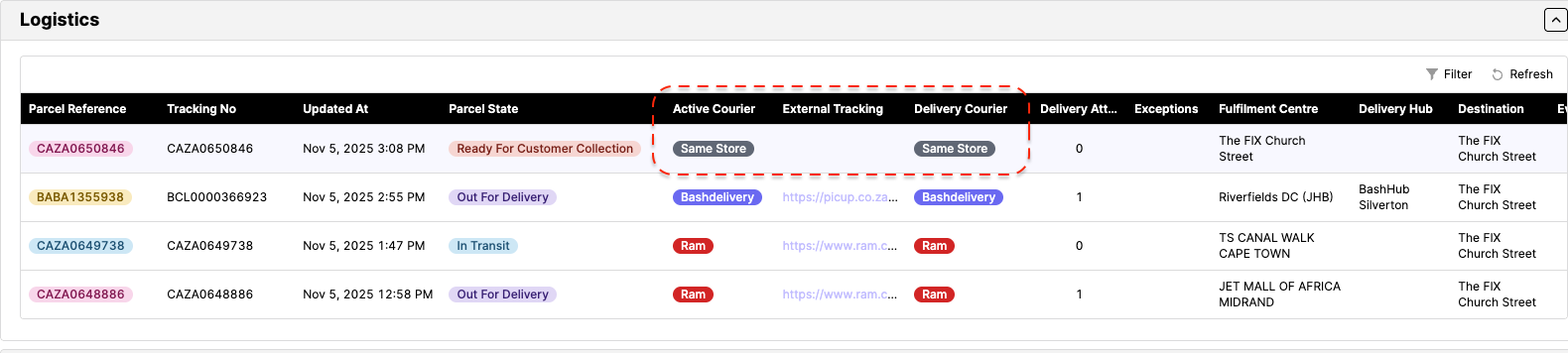
1.1) Identify whether the fulfilling store is the same store as the PUP by checking the Logistics tab on Bash Admin. If the Active Courier column and the Delivery Column say “same store”, this means that the fulfilment store is the PUP. If they are the same, proceed to step 1.2. If the fulfilment store is not the same as the PUP, follow the Stuck Orders SOP from step 1.2.
1.2) If the order shows as delivered but not scanned in (arrived at PUP), escalate with Store Ops using the “Store unable to find CnC parcel” catalogue item. Request that the store locate the parcel and scan it in so the OTP can be sent to the customer.
1.3) Once the store confirms that they have resolved the matter, let the customer know that they can collect their parcel.
3. Attachments/Appendices
Annexure A
Note:
This SOP is a living document and should be reviewed and updated regularly to ensure accuracy and relevance.
All employees involved in the process should be familiar with and adhere to this SOP.
Was this article helpful?
That’s Great!
Thank you for your feedback
Sorry! We couldn't be helpful
Thank you for your feedback
Feedback sent
We appreciate your effort and will try to fix the article