Table of Contents
- Purpose
- Procedure
- Order Item Tab
- Fulfilment Tab
- Logistics Tab
- Tracking a Parcel
1. Purpose
This SOP guides agents on how to understand order tracking statuses in Bash Admin and use them to assist customers effectively.
2. Procedure
Context
Agents use Bash Admin to track parcel progress and provide accurate updates to customers.
3. Order Item Tab (See Annexure A)
Displays all purchased items (SKU, description, size, colour, status, tracking number).
- SKU: Unique product code
- Item Description: Product name/details
- Status: Order progress (e.g. Awaiting Picking, Handed Over, Delivered, Cancelled, Returned, Refunding)
- Tracking Number: Used to track parcels and identify grouped items
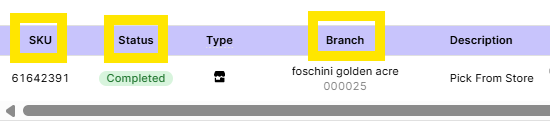
4. Fulfilment Tab (See Annexure B)
Shows where the item is fulfilled from (store or warehouse).
- Status meanings:
- Allocated – Assigned to store/warehouse
- Pick Failed – Could not be fulfilled
- Completed – Packed and ready for courier
- Branch: Store/warehouse details
5. Logistics Tab (See Annexure C)
Shows delivery progress.
- Parcel Reference: Tracking number
- Parcel State: Current status (e.g. Out for Delivery)
- Delivery Attempts: Number of attempts made
- Exceptions: Issues (e.g. Cancelled, Reallocated)
- Delivery Hub: Routing hub
6. How to Track a Parcel
- Search order in Bash Admin
- Confirm the item with the customer
- Check item status
6.1 Status Handling
6.1.1 Awaiting Picking / Accepted
- < 3 days: Advise 3–5 day delivery
- 3 days: Follow Stuck Order SOP
61.2 Handed Over
- In SLA: Advise delivery timeline
- Out of SLA: Escalate to courier
- No movement (3 days): Follow Stuck Order SOP
6.1.3 Out for Delivery
- Delivery expected today (no exact time)
6.1.4 Delivered
- Confirm delivery date
- If not received: Follow the Missing Items SOP
6.1.5 TFG Cancelled / Refunding
- Item out of stock or refund in progress
- Refer to the relevant Order/item cancellation (TFG Cancelled) SOP
6.1.6 Returned
- Refund processed (RTS, failed delivery, etc.)
- Refer to Refund Troubleshooting SOP
6.1.7 Being Collected
- Customer return logged
- Refer to Courier Collection Follow-up SOP
Attachments/Appendices
Annexure A:

Annexure B:
Annexure C:

Note:
This SOP is a living document and should be reviewed and updated regularly to ensure accuracy and relevance.
All employees involved in the process should be familiar with and adhere to this SOP.
Was this article helpful?
That’s Great!
Thank you for your feedback
Sorry! We couldn't be helpful
Thank you for your feedback
Feedback sent
We appreciate your effort and will try to fix the article