Table of Contents
1. Purpose
2. Common Scenarios
3. Procedure
Troubleshooting
Vetting and Actions
Ticket updates and Resolution Process
4. Attachments/Appendices
1. Purpose
This SOP outlines the process to follow when customers reach out to JDBash Support because they have not received their Click & Collect OTP needed to pick up their parcel from the selected store.
This SOP applies to the new OTP Resend App built in Retool. The app allows frontline agents to search by order number or parcel number and resend OTPs directly via Email, SMS, or Both channels.
2. Common scenarios
OTP Not Received (via SMS or Email)
The customer never received the OTP and cannot collect their parcel.Incorrect Contact Details or Failed Send
The OTP exists but cannot be delivered due to incorrect email/phone details or a comms failure. In this case, escalate to 2nd Line Ops to reveal the OTP in the Retool app and share it with the customer.
3. Procedure
1. Troubleshooting
1.1) Use the OTP Resend App:
Enter the customer’s order number or parcel number in the search bar. (annexure A)
The app will display all parcels linked to the order.
Choose the resend method: Both, SMS, or Email.
“Both” will send both SMS and an Email.
A confetti animation confirms the OTP was sent.
1.2) If the above is not available to resend, check below: Escalate to 2nd Line Ops if:
The app shows “OTP not found” for the parcel in question.
The customer reports no OTP received, even after you successfully triggered a resend.
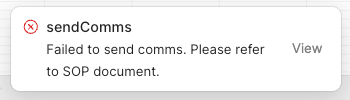
The app shows an error pop-up in the bottom right, indicating the send failed. (annexure B)
2 Vetting and Actions
2.1) For OTP retrieval:
If OTP not found:
Manually check Pargo via the Pargo system.
Retrieve and copy the OTP.
If comms failure or incorrect contact details:
Use the Retool app’s “Reveal OTP” function (available only to CS Ops users).
Share the OTP securely with the frontline team to pass on to the customer.
If there is still no OTP, please proceed to step 3.
3. Create a service request (SR) to Supply Chain using the catalogue item. Store is unable to find a CnC parcel, and the team will reach out to the store to confirm that the parcel is there and request the store to do a manual handover.
3.1 When you hear back from the SC Team, email the customer to advise of the resolution. Set the ticket to pending.
4. Attachments/Appendices
Annexure A:
Annexure B:
Note:
This SOP is a living document and should be reviewed and updated regularly to ensure accuracy and relevance.
All employees involved in the process should be familiar with and adhere to this SOP.
Was this article helpful?
That’s Great!
Thank you for your feedback
Sorry! We couldn't be helpful
Thank you for your feedback
Feedback sent
We appreciate your effort and will try to fix the article